

CS6 is dead to me...
My wife reckons I have more Apple Mac’s than pairs of socks, she might be right. I have an ‘everyday driver’ MacPro 5.1 for email, CCTV, web browsing and maintaining the websites and social media accounts I administer for people and organisations. I’ve maxed the RAM, added a Metal GFX card, replaced the processor for a 3.06GHz 6 core and added SSD’s. I also have a 2020 27” iMac used for video editing with Davinci Resolve and a Mac ‘Mini’ used for my Church that I take with me every Sunday to run the service on using Presenter from WorshipTools and I'll have a blog post about that App soon.
Just recently, I added an old 2008 MacPro 3.1, Dual 3.2GHz to use as a dedicated VHS tape to digital setup with a Blackmagic Decklink2 card (I also have a spare 2008 MacPro 3.1 Dual 2.8GHz and even a PowerMac 9600 with Media100 in the garage).
Back to my everyday driver, it’s a 2010 5.1, I used it to run Final Cut Pro 7 which it did very well. When I dropped FCP 7 in 2015 and switched to Final Cut X, I used DosDude’s software to get it to run OS’s up to Mojave.
One software item I needed to continue to use, was Photoshop CS6 along with various plugins I’ve bought. I have a fully legal ‘Production’ studio package that originally cost around £1500. Using Mojave, only Photoshop continued to work and no way was I going to jump on the subscription model that Adobe now wants to be able to use Photoshop, so I’ve stuck with Mojave.
When the Dual 3.2GHz MacPro arrived for my dedicated VHS to digital setup, I installed my copy of Photoshop CS6, along with my bought plugins and actions, which then left me able to ‘update’ my daily driver to Catalina.
Stay with me, the whole point to this blog item will become apparent......
After a bit of jiggery pokery (technical term!) and a lot of hard drive swapping, I now have a fully working version of Catalina, thanks to DosDude on a blazing fast Mac that Apple says should have been sent to the scrap heap years ago. For the first time ever during the process, I used ‘Transfer Apps and data from another Mac or drive’ and couldn’t believe it all actually worked!
Booting up to Catalina I just needed to see that Photoshop CS6 hadn't make the transition....It was one of 3 Apps that didn’t.
OK, getting to the point of this blog item, using my daily driver Mac, I get photos emailed in to put on the Facebook pages I'm the Admin for, they need to be optimised, often straightened and then resized for quick posting on Facebook or Instagram, I had this down to a fine art with CS6. I’d looked at other photo packages, like Affinity (although not so impressed with Affinity ATM!) which I use for photo work but I wanted something more basic that I could use quickly.
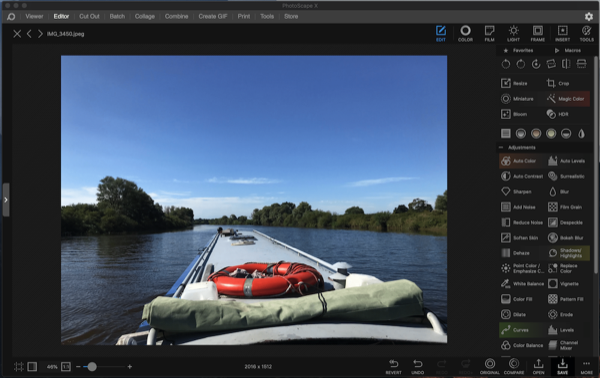
Searching the web, I found PhotoScapeX, it’s Mac OS X (or Windows 10) with a free or paid version, I tried the free version then paid for the ‘Pro’ version, I cannot believe there is not a lot more noise or hype about this App - it’s amazing!
It’s as simple or as full featured as you want, ideal for a quick optimise and resize or a full photo workout, it can edit photos, do cut outs, create collages, use layers, create GIF’s, add text and a whole host of other functions. The ‘Pro’ version (was £34.99, now £39.99) unlocks all features, hides all ads and includes some fun stickers like speech bubbles or arrows that are easy to just drop on a photo. There's also a full set of instruction videos on the website but see the warning at the end of this post!
There are so many built in features and effects and I’m still exploring most of them, previously in Photoshop CS6, I had to add either actions or plugins, often at extra cost.
I highly recommend you take a look at PhotoScapeX, if you buy the Pro version you might never look at Photoshop again and save yourself a bunch of cash in the process - x.photoscape.org/
Important - I notice the website address is still HTTP and not HTTPS so for Mac users I suggest you find PhotoScapeX via the App Store.
(Postscript - I've now pushed the MacPro 5.1 one step further using OpenCore Legacy Patcher and installed Big Sur instead of Catalina and it's still running like a train and crash free!)
It’s as simple or as full featured as you want, ideal for a quick optimise and resize or a full photo workout, it can edit photos, do cut outs, create collages, use layers, create GIF’s, add text and a whole host of other functions. The ‘Pro’ version (was £34.99, now £39.99) unlocks all features, hides all ads and includes some fun stickers like speech bubbles or arrows that are easy to just drop on a photo. There's also a full set of instruction videos on the website but see the warning at the end of this post!
There are so many built in features and effects and I’m still exploring most of them, previously in Photoshop CS6, I had to add either actions or plugins, often at extra cost.
I highly recommend you take a look at PhotoScapeX, if you buy the Pro version you might never look at Photoshop again and save yourself a bunch of cash in the process - x.photoscape.org/
Important - I notice the website address is still HTTP and not HTTPS so for Mac users I suggest you find PhotoScapeX via the App Store.
(Postscript - I've now pushed the MacPro 5.1 one step further using OpenCore Legacy Patcher and installed Big Sur instead of Catalina and it's still running like a train and crash free!)
